
Do you want to learn how to restore files in Legacy Family Tree? If so, then you wouldn’t regret coming across this page. Here we have provided you with the absolutely effective steps that will help you get done with the same within the least time possible. Hence, by going through the instructions carefully, you will be able to restore Legacy Family Tree files.
You should note that making frequent backup copies of your family files while you work on them is fundamental. Every computer eventually experiences some form of malfunction. Hard drives, motherboards, and memory can all malfunction. In addition, users have lost family files due to house fires, hurricanes, and other calamities. Having a current backup of your important files will make you very happy when one of these things occurs (or you will feel awful if you don’t). This applies to everything you store on your computer, not just your family’s files. Keep regular backup copies of everything you don’t want to lose.
How to restore legacy family tree files
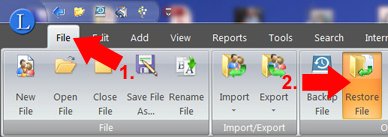
1. On the Ribbon bar, select the File tab.
2. After that, select Restore File.
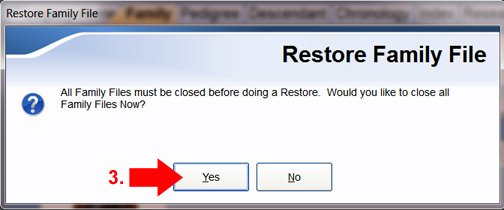
3. Before continuing, you must close any open family files. Select “Yes.”
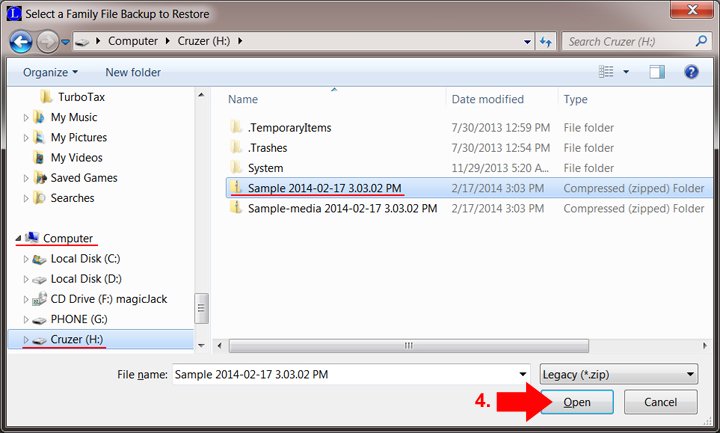
4. Browse to your backup file and click Open. The Cruzer USB flash drive was used to store the backup file in the example below. Legacy browses to the backup location, which in this case is Computer > Cruzer (H:), using a standard Windows screen. Please click here http://legacyfamilytree.host4kb.com/article/AA-00862 if you are unsure how to navigate to your backup file.
Note: You will receive an error message stating that there is no family file for restoration if you attempt to restore a multimedia backup.
To learn how to backup Legacy Files, click here: https://legacyfamilytreehelp.com/backup-legacy-files-and-restore/
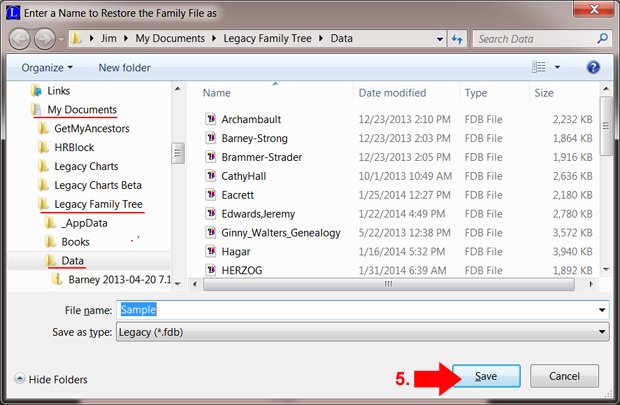
5. The “Enter a Name to Restore the Family File” screen will show up. The name of the family file will already be entered. This screen is crucial because it is where your family file will be restored. Click Save after navigating to the directory (folder) containing your family files. In the example below, the restored file will be kept in My Documents’ Legacy Family Tree\Data subfolder.
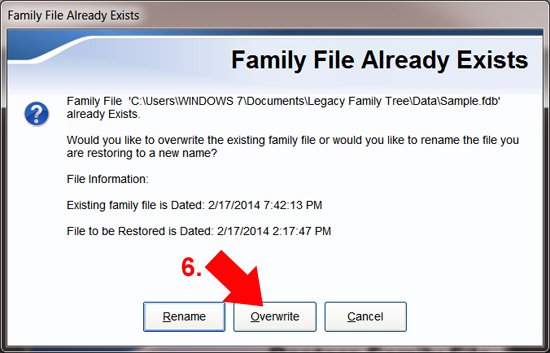
6. You will have the option to either rename or overwrite any existing family files with the same name. The simplest option is overwriting, which avoids the issue of producing several, confusing copies with different names and numbers of people. (However, in certain situations, you might want to rename the file to prevent overwriting existing data.)
The Family File Already Exists screen won’t appear if there isn’t an existing family file.
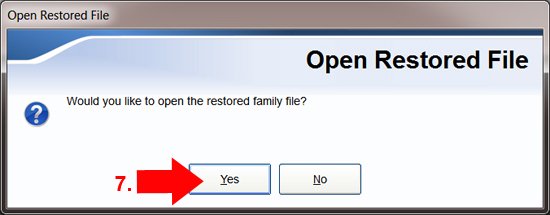
7. Click ‘Yes’ to open the restored file.
Conclusion
You should be able to restore Legacy Family Tree files effortlessly by following the given steps above. In case you face any problem or need more assistance regarding the same, then Legacy Family Tree help +1-800-697-1474 number or Live Chat is always available 24/7 to help you. We have the most eligible tech support; therefore will ensure that you get the best guidance and solutions in no time.